Informational

SMS Authentication for nopCommerce: Adding a Second Lock to Customer Accounts

July 23, 2026
SMS Authentication for nopCommerce
Business development manager - Bangladesh Software Solution
Share:

Introduction: One Password Is Only One Lock

A business account protected by only a password is like a home secured with a single lock. It may look strong, but once the key is stolen, copied, or guessed, nothing else protects what is inside. For an online store, that “home” contains customer profiles, order histories, delivery addresses, payment-related information, and valuable business data.

Passwords are often reused, exposed through phishing, leaked in third-party breaches, or targeted by automated login attacks. When a business relies only on password-based access, one compromised credential can open the door to account takeover, fraudulent orders, and data exposure.

When an unauthorized user acquires a password, a single-factor authentication system grants them immediate, full access. To extend the metaphor, mobile phone two-factor authentication (2FA) via Short Message Service (SMS) One-Time Passwords (OTP) functions as a secondary, heavy-duty deadbolt. Even if a cybercriminal successfully obtains or guesses the primary key, they are immediately halted at the entrance. Entrance requires a second, temporary key that is generated dynamically and delivered directly to the physical mobile device held by the verified account owner.

For early-stage startups and expanding e-commerce merchants operating on platforms like nopCommerce, establishing stronger login security is essential. Building customer trust takes time, but one security incident can damage confidence quickly. A reliable SMS authentication plugin for nopCommerce helps businesses reduce unauthorized access and protect customer accounts more effectively as they grow.

What Is Mobile Phone Authentication?

At its technical core, mobile phone authentication is an identity verification mechanism that relies on something the user possesses—specifically, access to a registered mobile phone number—in addition to something the user knows, such as a static password.

In modern digital identity frameworks, verification is categorized across three primary factors:

  • Knowledge Factors: Information the user knows, such as passwords, PINs, or security answers.
  • Possession Factors: Physical objects or hardware devices owned by the user, such as a registered mobile phone, SIM card, hardware token, or security key.
  • Inherence Factors: Biological attributes unique to the user, such as fingerprints, facial geometry, or retinal scans.

Mobile phone SMS authentication combines a Knowledge Factor (password) with a Possession Factor (possession of the mobile handset receiving an SMS code). During an authentication attempt, the underlying identity engine generates a time-limited, pseudo-random numeric code—known as a One-Time Password (OTP)—and dispatches it via a telecommunications SMS gateway to the user’s mobile number. Access is authorized only when the recipient enters the exact matching code within a strict expiration window.

It is crucial for technical decision-makers to distinguish between authentication and authorization:

  • Authentication: The process of verifying whether an entity is truly who they claim to be (e.g., verifying that the person logging in controls the registered phone number).
  • Authorization: The process of determining what actions, resources, or permissions an authenticated identity is permitted to access (e.g., granting administrative rights or access to customer order history).

📌 Technical Distinction Note

While SMS OTP significantly elevates access security compared to static passwords alone, it operates strictly as a possession-based factor. It does not utilize cryptographic hardware enclave keys or biometric signatures, and therefore should be implemented as part of a defense-in-depth architecture rather than assumed to be cryptographically phishing-resistant.

Why Password-Only Login Creates Business Risk

Relying strictly on username-and-password combinations introduces severe operational and financial vulnerabilities for online businesses. Human behavior remains the primary weakness in single-factor credential systems.

  • Password Reuse Across Services: Over 60% of internet users recycle passwords across personal and commercial accounts. When a third-party website suffers a data breach, cybercriminals harvest those leaked credentials and test them against thousands of popular e-commerce platforms using automated tools.
  • Credential Stuffing & Brute-Force Attacks: Automated botnets execute millions of login attempts per hour, systematically trying common password variations and stolen credential lists against merchant login forms.
  • Phishing & Social Engineering: Deceptive emails and fake web pages trick users into willingly typing their passwords into fraudulent forms controlled by attackers.
  • Weak Password Selection: Despite complex password rules, users frequently select predictable strings incorporating simple substitutions, dates, or business names.
  • Fraudulent Password-Reset Requests: Single-factor password reset flows that rely solely on email links are vulnerable if the user’s email account has been compromised or if password-reset endpoints lack rate-limiting.

📌 Realistic Business Scenario: The Scaling nopCommerce Store

Consider a growing online fashion merchant built on nopCommerce. The store processes 300 orders daily and stores customer shipping addresses, telephone numbers, and order histories. An attacker purchases a database of 500,000 compromised credentials leaked from an unrelated online portal. Using a credential-stuffing bot, the attacker tests these login pairs against the store’s customer login portal overnight.

Without multi-factor authentication, the bot successfully gains access to 450 customer accounts whose owners reused passwords. The attacker logs into these accounts, modifies shipping addresses, drains accrued store credit, attempts purchases using saved payment profiles, and harvests personal identity details. Beyond the immediate financial fraud, the store suffers severe reputational damage, customer churn, and payment gateway dispute fees—all stemming from single-factor login vulnerability.

The Scale of the Login Security Problem

To appreciate the necessity of secondary authentication, enterprise leaders must examine the sheer volume of global credential targeting observed across the cybersecurity industry.

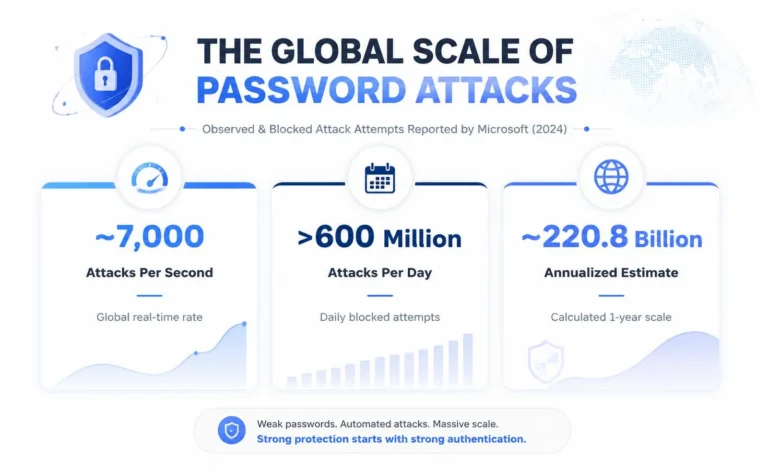
Scale of global password attack
Figure: Scale of global password attack attempts observed and blocked by Microsoft in 2024.

According to the Microsoft Digital Defense Report 2024, identity-focused cyberattacks continue to operate at a staggering velocity. Microsoft observed and blocked approximately 7,000 password attacks per second globally throughout their identity systems [1]. On a daily basis, this rate translates to more than 600 million attempted password attacks every 24 hours. When annualized, an attack rate of 7,000 attempts per second equates to approximately 220.8 billion attempted password attacks over the course of a single year.

📌 Statistical Clarity

The 220.8 billion figure represents an annualized extrapolation of observed or blocked password attack attempts across global identity endpoints. It reflects automated brute-force and credential-stuffing traffic, rather than successful unauthorized breaches or individual compromise incidents.

Figure: Scale of global password attack attempts observed and blocked by Microsoft in 2024.

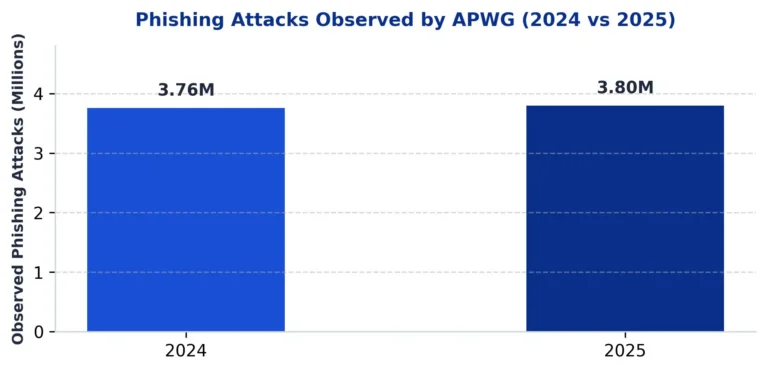
Simultaneously, social engineering and credential harvesting remain at record levels. The Anti-Phishing Working Group (APWG) observed approximately 3.8 million phishing attacks in 2025, representing a slight increase over the approximately 3.76 million observed attacks recorded in 2024 [2]. Phishing campaigns heavily target identity credentials, luring victims into inputting account names and passwords onto deceptive replica portals.

The operational impact of compromised credentials is documented in the Verizon 2025 Data Breach Investigations Report (DBIR). Verizon’s analysis revealed that compromised credentials were utilized as an initial access vector in approximately 22% of all confirmed security breaches studied [3].

Startup founders and small store owners often operate under the dangerous myth that cybercriminals only target large enterprise corporations. In reality, automated attack scripts continuously scan the public internet for vulnerable login endpoints regardless of company size. Small and medium-sized e-commerce sites are frequently targeted precisely because attackers assume smaller organizations possess weaker identity controls.

How Two-Factor Authentication Adds a Second Lock

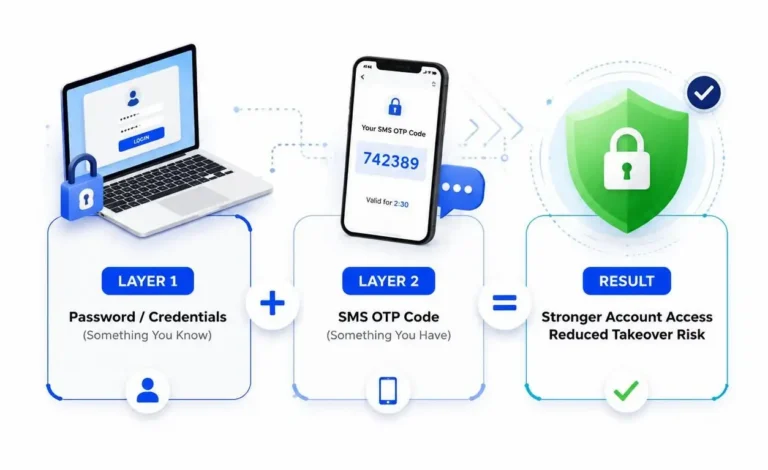
Two-factor authentication establishes an sequential verification process that prevents a compromised password from automatically granting account access.

Two-layer authentication concept combining knowledge and possession factors.

When 2FA is active, the login architecture operates through the following structured sequence:

  1. Primary Authentication: The customer submits their registered email/phone and static password.
  2. Credential Validation: The core system verifies the primary password against encrypted store hashes. If valid, the system pauses full session creation and triggers the second factor.
  3. OTP Generation & Transmission: The authentication engine generates a single-use numeric code, applies expiration rules, and transmits it via SMS to the user’s verified phone number.
  4. Verification Submission: The user inputs the received OTP into the login verification prompt.
  5. Rule Assessment & Grant: The system verifies code accuracy, expiration window, failed attempt counters, and rate limits. Once validated, an authenticated user session is established.

Even if an attacker obtains a customer’s valid password via a database leak or phishing campaign, they cannot complete Step 4 without physical control of the customer’s phone. This secondary barrier eliminates the vast majority of automated credential-stuffing attacks.

Practical Use Cases Across the Customer Lifecycle

Integrating phone verification across multiple touchpoints strengthens store operations beyond standard login authorization:

  • Customer Registration: Verifies mobile numbers at account creation, preventing spam bot accounts and fake user registrations.
  • Account Login & 2FA: Requires OTP verification during customer sign-in to protect accounts against credential stuffing.
  • Secure Password Recovery: Replaces vulnerable email-only reset flows by requiring phone confirmation before issuing password resets.
  • Sensitive Account Changes: Triggers OTP confirmation when users modify shipping addresses, contact email addresses, or payment details.
  • High-Risk Checkout Verification: Requests phone authorization during high-value transactions or unusual location logins.
  • Automated Order Notifications: Dispatches transactional SMS messages regarding order confirmations, shipping updates, and delivery status.

How the Bangladesh Software Solution Phone SMS Authentication Plugin Helps

To implement these security workflows natively within nopCommerce, Bangladesh Software Solution developed the Bangladesh Software Solution Phone SMS Authentication plugin. Designed specifically for nopCommerce architectures, the module extends store authentication and customer notification capabilities.

The plugin provides an extensive suite of configurable store administrator capabilities:

  • Phone-Based Registration & Login: Enables customers to register, authenticate, and recover passwords using their mobile phone numbers alongside traditional email logins.
  • Configurable OTP Security Rules: Allows administrators to set exact OTP numeric lengths, expiration windows (e.g., 300 seconds), resend cooldown periods, and maximum failed attempt thresholds.
  • Rate Limiting & Anti-Abuse Controls: Enforces hourly and daily SMS request limits per IP address or phone number to prevent SMS pumping fraud and gateway cost inflation.
  • International Phone Validation: Supports international country prefixes, phone format validation rules, and multi-region telecommunications routing.
  • Multi-Gateway SMS Management: Integrates with multiple custom SMS gateways, custom API endpoints, authorization credentials, and custom Sender IDs.
  • Dynamic SMS Message Templates: Includes customizable message templates with dynamic tokens (e.g., %CustomerName%, %OTPCode%, %OrderNumber%).
  • Transactional Order Notifications: Automates SMS alerts for order placement, payment updates, and shipment status changes.
  • Queue Monitoring & Log Management: Provides real-time SMS queue tracking, failed message retry mechanisms, and detailed transmission logs within nopCommerce admin.
  • Multi-Store & External Linking: Supports nopCommerce multi-store configurations and external authentication account linking.

📌 Configuration Responsibility

The Bangladesh Software Solution Phone SMS Authentication plugin provides flexible security controls, but security effectiveness depends on administrator setup. Store managers must actively configure rate limits, lockout rules, and short OTP expiry windows within nopCommerce settings.

Conclusion: Add the Second Lock Before the Business Grows

Returning to our opening analogy, leaving a commercial building secured by a single lock is an unjustifiable risk when simple secondary locks are readily available. For nopCommerce merchants, startup founders, and growing online stores, password-only authentication leaves customer accounts exposed to automated credential stuffing, phishing harvesting, and account takeover attacks.

Establishing two-factor phone authentication early in your business journey creates a resilient identity architecture. The BSS Phone SMS Authentication plugin provides the native nopCommerce integration, multi-gateway controls, rate-limiting rules, and order communication features required to protect customer accounts while supporting business growth.

📌 Strengthen Your nopCommerce Login Experience

Learn more about the Bangladesh Software Solution Phone SMS Authentication plugin, or contact Bangladesh Software Solution to discuss installation, configuration, customisation, or nopCommerce security requirements.

Frequently Asked Questions

What is SMS authentication?

A: SMS authentication is a security process that verifies a user’s identity by sending a short, time-limited One-Time Password (OTP) code via text message to their registered mobile phone during login or registration.

Yes. SMS OTP adds a mandatory second authentication factor (something you possess) to your password (something you know). This prevents attackers from accessing an account using stolen or leaked passwords alone.

Yes. The Bangladesh Software Solution Phone SMS Authentication plugin enables customers to register, sign in, and verify their identity using their mobile phone number alongside or in place of traditional email logins.

Yes. The plugin allows store owners to configure phone-based password recovery, requiring users to verify an SMS OTP before resetting their account password.

The plugin includes configurable rate-limiting controls, including mandatory resend cooldown timers, maximum hourly/daily request caps per IP or phone number, and failed-attempt lockouts.

Yes. The plugin supports international phone number formatting, country prefix validation rules, and multi-region telecommunications routing.

Yes. The plugin supports flexible custom API configurations, allowing store administrators to connect with virtually any SMS gateway provider using custom API endpoints, credentials, and Sender IDs.

While SMS OTP significantly improves security for general customer accounts, Bangladesh Software Solution recommends pairing high-privilege administrator logins with hardware-backed, phishing-resistant factors such as FIDO2 / WebAuthn passkeys or authenticator app TOTP.

Legal disclaimer

This article provides general business and technology information as at 16 July 2026. It is not legal, tax, employment, cybersecurity or regulatory advice. Applicability depends on the organisation, data, sector, contracts, technology and processing locations. Obtain qualified advice before relying on it for a specific engagement.