Informational

How to Hire Remote SOLIDWORKS Automation Developers: A Global Guide

Hire Remote SOLIDWORKS Automation Developers
Business development manager - Bangladesh Software Solution
Share:

A practical guide for engineering and manufacturing leaders evaluating CAD/CAM automation talent worldwide.

Most manufacturing teams know exactly which task they want automated — batch drawing updates, BOM generation, configuration management — but struggle with a harder question: does this candidate understand both software development and mechanical engineering workflows? Companies that hire remote SOLIDWORKS automation developers without a clear evaluation process often end up with brittle macros, undocumented code, or a single freelancer nobody else can support. This guide covers a practical, repeatable way to identify, evaluate, hire, and manage the right person or team, wherever they are based.

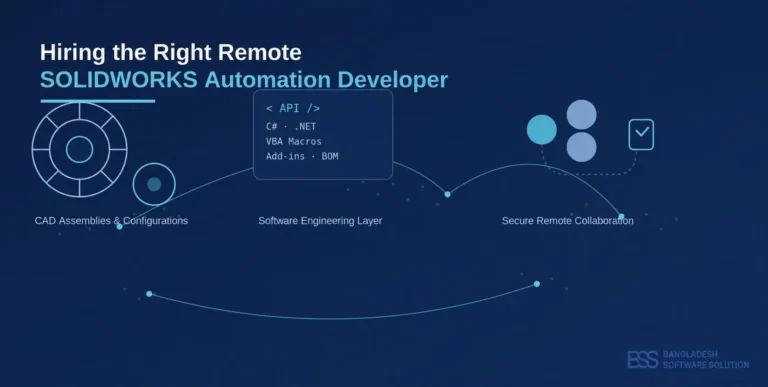
Hiring the right remote SOLIDWORKS automation developer combines CAD knowledge, software engineering, and secure global collaboration
Figure 1. Hiring the right remote SOLIDWORKS automation developer combines CAD knowledge, software engineering, and secure global collaboration.

What Does a SOLIDWORKS Automation Developer Do?

A SOLIDWORKS automation developer builds software that removes repetitive, manual work from a CAD-driven engineering process. The role sits between software engineering and mechanical design: it requires comfort with the SOLIDWORKS API, C#/.NET or VBA, and a working understanding of assemblies, configurations, and drawings.

In practice, this can mean automating repetitive modelling steps, building a C#/.NET add-in, writing a macro to batch-export DXF or STEP files, generating and updating BOMs, or connecting SOLIDWORKS to a PDM, ERP, or CAM system. Not every project needs all of these — the right skill set depends entirely on the workflow being automated.

Why Is It Difficult to Hire the Right SOLIDWORKS Automation Developer?

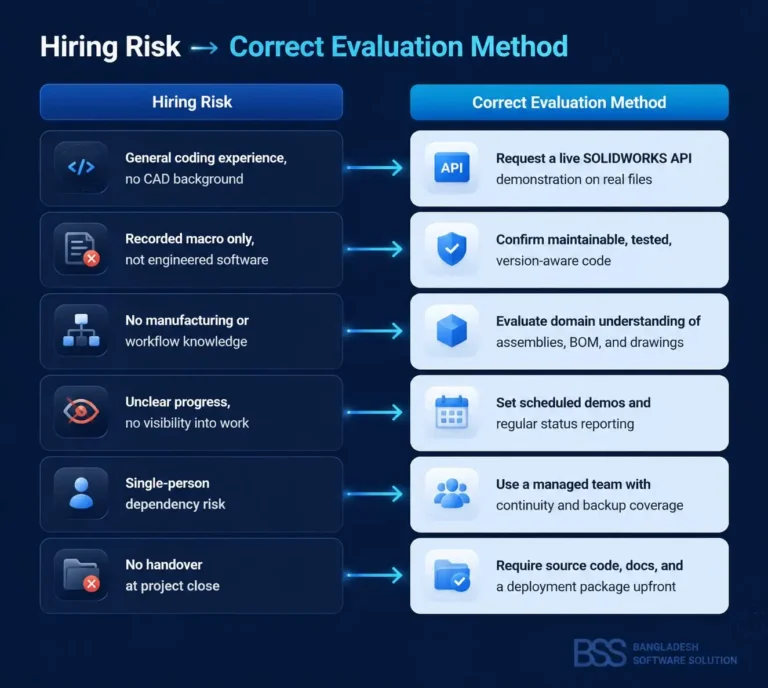
Knowing how to use SOLIDWORKS and knowing how to engineer, test, deploy, and maintain SOLIDWORKS automation software are two different skill sets, and job titles rarely make the distinction clear. A general software developer may write clean C# but has never opened an assembly tree. A power CAD user may know every menu but cannot structure error handling, version control, or a deployment package.

Other recurring risks include unverifiable API experience, macros that work on a test part but fail on a 500-component assembly, compatibility problems across SOLIDWORKS versions, weak communication across time zones, thin documentation, source-code ownership disputes, and total dependence on one freelancer with no handover plan.

Common Hiring Mistake

Judging a candidate purely on general programming ability, without confirming they can read a real assembly tree, handle configurations correctly, and hand over maintainable, documented code.

How to Hire Remote SOLIDWORKS Automation Developers

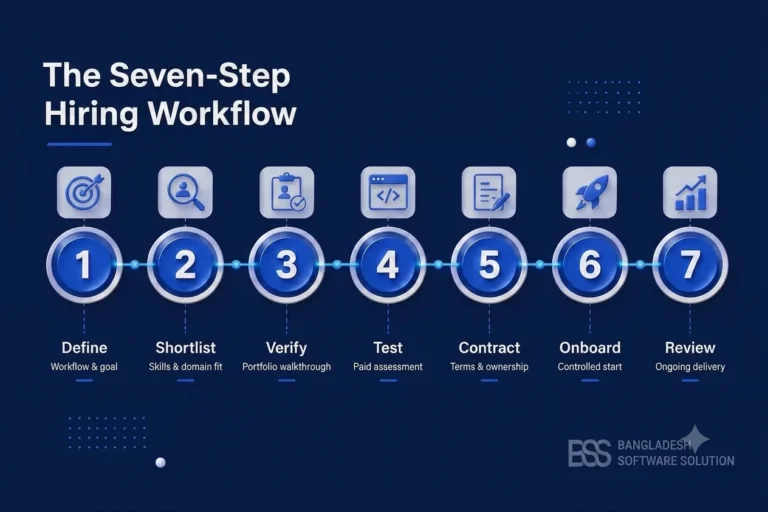
A structured process protects the project far better than a resume review. These seven steps work for a single macro or a multi-month integration.

Figure 2. The seven-step hiring workflow: Define, Shortlist, Verify, Test, Contract, Onboard, Review
  1. Define the workflow and a measurable goal. Document the exact manual task, how long it currently takes, and what “automated” should look like before writing a job description.
  2. Identify the required technical and domain skills. Decide whether the project needs the SOLIDWORKS API, C#/.NET, VBA macros, or integration with PDM, ERP, or CAM systems.
  3. Review portfolios and request a technical walkthrough. Ask the candidate to explain the architecture behind a past SOLIDWORKS API project, not just the finished output.
  4. Use a small, paid technical assessment. A short, compensated proof of concept on a representative file reveals more than any interview. Avoid unpaid “test projects.”
  5. Evaluate code quality, compatibility, and documentation. Ask for error handling, logging, version support across recent SOLIDWORKS releases, and basic test coverage.
  6. Agree on communication, security, and ownership. Confirm source-code ownership, maintenance responsibility, reporting cadence, and how CAD files will be handled.
  7. Begin with controlled onboarding. Start with a limited-scope task and a defined delivery checkpoint before expanding to the full workflow.
Figure 3. Mapping common hiring risks to the correct evaluation method.

Simultaneously, social engineering and credential harvesting remain at record levels. The Anti-Phishing Working Group (APWG) observed approximately 3.8 million phishing attacks in 2025, representing a slight increase over the approximately 3.76 million observed attacks recorded in 2024 [2]. Phishing campaigns heavily target identity credentials, luring victims into inputting account names and passwords onto deceptive replica portals.

The operational impact of compromised credentials is documented in the Verizon 2025 Data Breach Investigations Report (DBIR). Verizon’s analysis revealed that compromised credentials were utilized as an initial access vector in approximately 22% of all confirmed security breaches studied [3].

Startup founders and small store owners often operate under the dangerous myth that cybercriminals only target large enterprise corporations. In reality, automated attack scripts continuously scan the public internet for vulnerable login endpoints regardless of company size. Small and medium-sized e-commerce sites are frequently targeted precisely because attackers assume smaller organizations possess weaker identity controls.

Technical Evaluation Checklist

The right skill set depends on the workflow, so avoid reducing evaluation to a generic coding test. Look for:

  • Practical SOLIDWORKS API and object-model knowledge
  • C# and .NET skills, or appropriate macro-development experience
  • Understanding of assemblies, configurations, drawings, and BOM structure
  • PDM, ERP, or CAM integration experience, where relevant
  • Error handling, logging, and testing practices
  • Performance on large files and complex assemblies
  • Version compatibility and installer/deployment planning
  • Readable source code and clear documentation
  • General manufacturing-domain understanding

Red Flags When Hiring

Watch for candidates who cannot explain past architecture decisions, promise automation without reviewing sample files, never ask which SOLIDWORKS version you use, have no testing or source-control process, offer vague ownership terms, quote unrealistically low estimates, communicate poorly before the project starts, or rely on hard-coded file paths and fragile recorded macros instead of engineered logic.

Choosing the Engagement Model

Freelancers, local hires, managed dedicated remote developers, and fixed-scope project teams each suit different situations — no model is always correct.

Engagement Model Availability Continuity Support Best-Fit Project Type

Independent freelancer

Variable

Low

Small, one-off macros

Local full-time hire

High

Medium

Ongoing internal CAD tooling

Managed dedicated remote developer

High

High

Continuous automation and maintenance

Fixed-scope project team

Fixed to project

Medium

Defined, time-boxed integrations

Table 1. Comparing engagement models for CAD/CAM automation projects.

A managed, dedicated developer model tends to help when a company needs consistent availability, organizational oversight, replacement support, and ongoing maintenance rather than a one-time deliverable.

How to Manage a Remote Automation Developer Successfully

Once hired, ongoing structure matters as much as the initial vetting.

  • Agree overlapping work hours and hold weekly planning and demo sessions
  • Use shared task tracking, version control, and regular code reviews
  • Define acceptance criteria with test assemblies and keep documentation current
  • Request regular progress reports from a named point of contact
  • Confirm a backup and continuity plan for ongoing maintenance

Why Companies Work with Bangladesh Software Solution

Bangladesh Software Solution provides CAD/CAM automation developers who work full-time with Bangladesh Software Solution rather than as anonymous marketplace freelancers. Each developer is company-supervised and supported by an organized delivery process, whether engaged as a dedicated remote resource or as part of a defined project team. Engagements follow agreed reporting, code-review, QA, and documentation procedures, giving clients the oversight of an internal hire with the flexibility of a remote model.

BSS developers support custom SOLIDWORKS macros, C#/.NET add-ins, drawing and BOM automation, batch processing, CAD-to-CAM workflows, and ERP integration. Companies weighing this option can also review this offshore developer hiring guide and this guide to automating CAD tasks in SOLIDWORKS for further background.

Bangladesh Software Solution Experience in Industrial Automation

Beyond CAD/CAM work, Bangladesh Software Solution has applied the same problem-first approach to manufacturing automation more broadly. In one project, described in this precision manufacturing quality-control automation project, Bangladesh Software Solution replaced manual visual inspection on a caravan assembly line with a browser-based system using computer vision and marker-based alignment tracking to verify components, color accuracy, and frame alignment. It illustrates Bangladesh Software Solution’s ability to translate a manufacturing bottleneck into a working automation solution, independent of the specific CAD platform involved.

Conclusion

Hiring a remote SOLIDWORKS automation developer works best as a structured evaluation, not a leap of faith. Define the workflow, verify real API experience, test before committing, and agree on ownership and maintenance up front — whether you choose a freelancer, a local hire, or a managed remote developer.

Planning to automate a repetitive SOLIDWORKS or CAD/CAM workflow? Discuss your requirements with the Bangladesh Software Solution team and determine whether a dedicated remote developer or a project-based engagement is the better fit.

Frequently Asked Questions

What skills should a SOLIDWORKS automation developer have?

They should combine SOLIDWORKS API knowledge with C#/.NET or VBA skills, an understanding of assemblies, configurations, and BOM structure, and practical experience with error handling, testing, and version compatibility across SOLIDWORKS releases.

It depends on scope. A freelancer can suit a small, one-off macro, while a dedicated remote developer is usually better for ongoing automation, ERP or PDM integration, and long-term maintenance needing organizational oversight.

Use a small, paid proof of concept on a representative assembly rather than an unpaid test project. Review the resulting code for error handling, documentation, and how it performs on realistic file sizes.

Yes, when access controls, source-code ownership, and data-handling terms are agreed in writing before work begins, alongside standard practices like version control and restricted file sharing.

Timelines vary with workflow complexity, the number of SOLIDWORKS versions to support, required integrations, testing needs, and the condition of existing CAD files, so there is no single universal timeline.