Informational

SOLIDWORKS Automation for Furniture Manufacturing: Design, BOM & CNC

Business development manager - Bangladesh Software Solution
Share:

A customer asks for an 800 mm kitchen cabinet to be widened to 950 mm. Then they switch the finish from oak to walnut, choose a different door style, and add two extra drawers. On paper it’s a simple change request. In the engineering department, it means reopening the SOLIDWORKS model, updating panels and hardware, regenerating drawings, correcting the bill of materials, rebuilding the cut list, and re-exporting production files before the order can reach the shop floor.

Multiply that by dozens or hundreds of custom orders a month, and a single configuration change becomes a full-time engineering task. This is the point where manual CAD work stops supporting the business and starts holding it back — and it’s exactly where SOLIDWORKS automation for furniture manufacturing earns its place on the engineering roadmap.

Why Furniture and Cabinet Manufacturers Need SOLIDWORKS Automation

Custom furniture and cabinetry are rarely one-off designs built from scratch. Most orders are variations on a known product: a taller wardrobe, a kitchen run with an extra corner unit, a cabinet range offered in five finishes instead of one. Each variation still requires an engineer to manually adjust dimensions, reassign materials and door colours, recheck the bill of materials, regenerate drawings, and export fresh DXF files for CNC cutting — work that repeats, order after order, with only the numbers changing.

This is precisely the kind of work that cabinet manufacturing automation is built to remove. When CAD tasks are predictable and rule-based — a width change drives panel resizing, a finish code drives colour assignment — they can be automated instead of repeated by hand, cutting manual errors, rework, and the time to CNC-ready files.

Manual Workflow Automated Workflow

Engineer changes dimensions manually

Parameters update the model

Finish assigned component by component

Rules assign materials and colours

BOM manually checked

BOM updates automatically

Drawings recreated

Drawings regenerate

DXFs exported individually

Production files generated automatically

What Can Be Automated in SOLIDWORKS for Furniture Manufacturing?

Parametric Cabinet and Furniture Design Automation

Parametric cabinet design automation links model geometry to a defined set of inputs: width, height, depth, shelf count, door and drawer configuration, and panel thickness. Change one number and the rules propagate through the entire assembly instead of requiring a manual rebuild.

A common example: a 900 mm base cabinet is reconfigured to 1,100 mm. With parametric rules in place, the carcass panels, shelves, doors, and hardware positions update automatically, rather than an engineer manually repositioning every component. This parametric cabinet design approach is the foundation most furniture design automation projects are built on, since dimensional variation is the most frequent change request in custom cabinetry.

Automated Materials, Door Colours and Finishes

Finish and colour changes are just as frequent as dimensional ones. Laminates, veneers, timber finishes, paint colours, and hardware-matched carcass colours all need to be applied consistently across doors, panels, and feature elements.

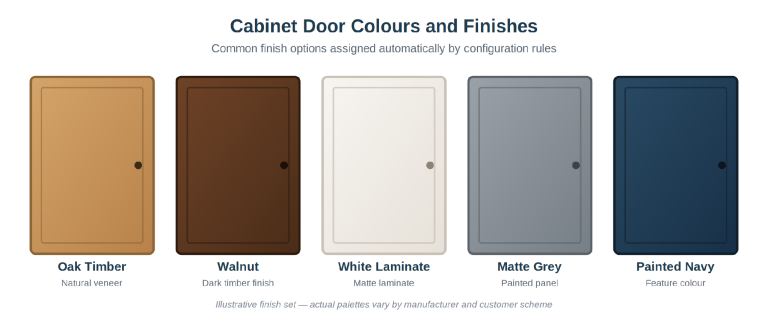
Illustrative cabinet door finish options assigned by configuration rules.
Figure 1. Illustrative cabinet door finish options assigned by configuration rules.

Rule-based colour and material assignment — driven by a configuration code, a customer’s chosen scheme, or a component’s role such as upper cabinet, lower cabinet, or feature panel — replaces manual, component-by-component colouring and reduces the inconsistencies that appear when different engineers apply finishes by hand.

Automated BOMs, Cut Lists and Manufacturing Drawings

Every dimensional or material change ripples through to documentation: panel counts, door and drawer quantities, hinges, runners, handles, fasteners, and material specs all need to stay in sync with the model. Automated BOM generation in SOLIDWORKS keeps these lists tied directly to the assembly instead of being rebuilt by hand for every order.

The same logic extends to SOLIDWORKS cut list automation and manufacturing drawings: panels resize, drawings regenerate, and cut lists reflect the current configuration — removing the repetitive rebuilding work that consumes the most time on a typical custom order, without removing engineering review.

SOLIDWORKS to CNC and Production File Automation

Once a configuration is finalized, production files still need generating: DXF exports for panel geometry, consistent file naming, part identifiers, and shop-floor-ready documentation. SOLIDWORKS CNC automation workflows can generate and name these files as part of the same rule set that drives the model, cutting the manual export work that otherwise happens order by order.

How a SOLIDWORKS Furniture Automation Workflow Works

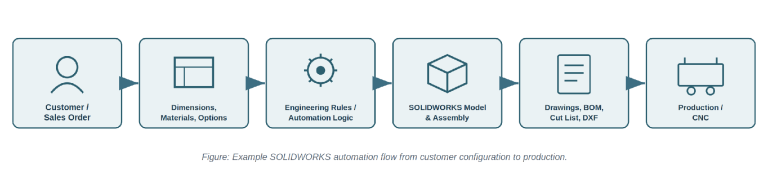
A typical SOLIDWORKS automation workflow starts where the order does. Customer or sales requirements — dimensions, material, finish, and options — feed into a set of engineering rules that translate those choices into a SOLIDWORKS model and assembly. From there, drawings, BOM, cut list, and DXF files are generated directly from the updated model rather than built as separate manual steps.

How a SOLIDWORKS Furniture Automation Workflow Works
Figure 2. Example SOLIDWORKS automation flow from customer configuration to production.

The value of this structure is that engineering effort goes into defining the rules once, not repeating the same manual steps for every order. A configuration that used to take hours of editing and file exports can move from confirmed order to production-ready files in a fraction of the time, with model, drawings, and BOM staying consistent by construction.

Real-World SOLIDWORKS Automation Example

Bangladesh Software Solution developed a SOLIDWORKS automation solution for an Australian caravan manufacturer, addressing a cabinetry and door-colour assignment challenge familiar to many furniture and cabinet manufacturers working with multiple finishes and configurations.

The Manual Cabinet Door Colouring Challenge

The manufacturer’s assemblies involved complex upper and lower cabinet colour rules across multiple design schemes, including a scheme the case study refers to as Coastal Luxe, and standardizing that logic across every configuration by hand proved genuinely difficult to manage. Colouring doors manually in SOLIDWORKS was slow, repetitive, and error-prone across assemblies with dozens of configurations. Different users often applied colours or materials inconsistently, creating visual and data mismatches between the model and the documentation. Keeping component references, material names, and colour codes synchronized across configurations required constant manual verification, and any model revision or scheme change meant redoing assignments from scratch — a high rework rate that consumed valuable engineering time. Expanding to new product lines or customer-specific schemes only amplified these issues, and without a systematic way to track which configurations used which colour sets, quality checks and audits became harder to rely on, while preparing colour-allocation reports for manufacturing stayed tedious and error-prone.

How Bangladesh Software Solution Automated the SOLIDWORKS Workflow

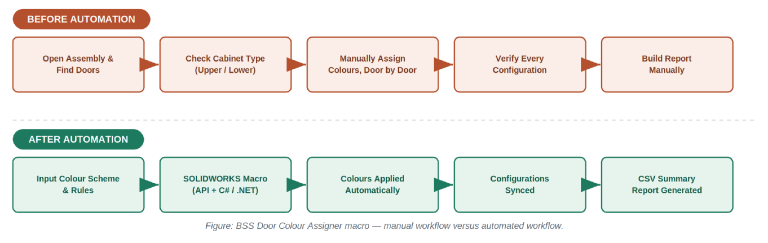
Bangladesh Software Solution built a custom macro, the Door Colour Assigner, using the SOLIDWORKS API with C# and .NET, taking configuration input through the Configuration Manager UI. The macro verifies the assembly and model, reads colour-scheme and door part-number data from an input file, and applies scheme rules: one colour to upper-door assemblies, another to remaining assemblies, and a third to feature-wall parts detected by thickness, with the correct code embedded in each component reference. It then generates a CSV summary log of the final colour mapping for quick verification and reporting.

Figure 3. BSS Door Color Assigner macro - manual workflow vs atomation workflow

How This Applies to Furniture and Cabinet Manufacturing

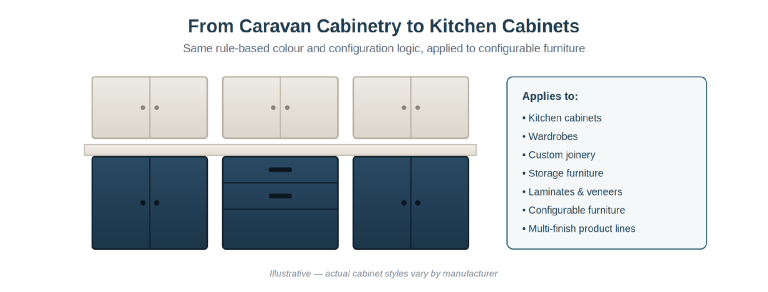
The original project addressed caravan cabinetry, but the underlying logic — rule-based colour and material assignment tied to component role and configuration — applies directly to kitchen cabinets, wardrobes, custom joinery, and other storage furniture. Any manufacturer managing multiple finishes, laminates, veneers, or product variants across configurable furniture faces a comparable manual bottleneck, and can apply a similar automation approach to its own SOLIDWORKS workflow.

Figure 4. Illustrative - actual cabinet styles very by manufacturer

Business Benefits of SOLIDWORKS Automation for Cabinet Manufacturers

The business case for SOLIDWORKS automation centers on engineering time and consistency rather than any single metric. Manufacturers that automate repetitive configuration work typically see:

  • Less repetitive CAD work, freeing engineers for higher-value design tasks
  • Fewer configuration errors and less rework when orders change late
  • More consistent drawings, BOMs, and manufacturing data across every order
  • Faster handling of custom orders without slowing the wider schedule
  • Easier expansion into new product variations and finishes
  • A shorter path from confirmed order to production-ready files

For manufacturers scaling custom-order volume, this kind of automated manufacturing drawings and documentation workflow matters as much as any single time-saving figure — it’s what keeps engineering capacity from becoming the limiting factor on growth.

When Should a Furniture Manufacturer Consider SOLIDWORKS Automation?

SOLIDWORKS automation is worth investigating when familiar patterns show up: engineers repeatedly designing similar products, constant dimension changes, growing configuration counts, or BOMs and drawings updated by hand for every order. If custom-order volume is growing faster than engineering headcount, that’s usually the clearest signal — automation lets a team support more configurations without scaling the manual workload in step.

Conclusion

Furniture manufacturers don’t need to automate everything at once. Many start with a single bottleneck — cabinet configuration, door finishing, drawing generation, BOM creation, cut-list generation, or production file export — and expand from there once the first workflow proves its value.

Bangladesh Software Solution’s door-colour automation project for an Australian caravan manufacturer, detailed in its case study, is one example of what a focused SOLIDWORKS automation solution can look like in practice.

Have a repetitive SOLIDWORKS workflow in your furniture or cabinet engineering process? Bangladesh Software Solution can assess whether custom API automation, macros, or rule-based tools could streamline it.

Frequently Asked Questions About SOLIDWORKS Furniture Automation

What can be automated in SOLIDWORKS for furniture manufacturing?

SOLIDWORKS can automate dimension changes, configurations, materials, BOMs, cut lists, drawings, and CNC-ready DXF exports.

Yes. BOMs can update automatically when cabinet dimensions, materials, hardware, or configurations change.

Yes. SOLIDWORKS can automate DXF exports, file naming, and part identification for CNC production.

Design rules connect dimensions and options to the model, so changing one value automatically updates related components.

Yes. Automation can apply different sizes, materials, colours, finishes, and configurations based on predefined rules.

Yes. It works especially well for manufacturers producing repeated variations of cabinets, wardrobes, joinery, and configurable furniture.

Savings vary by workflow, but automation can significantly reduce repetitive modelling, documentation, and file-export tasks.