Informational

Ecommerce ERP Integration: Benefits, How It Works & Best Practices

Ecommerce ERP Integration: Benefits, How It Works & Best Practices
Business development manager - Bangladesh Software Solution
Share:

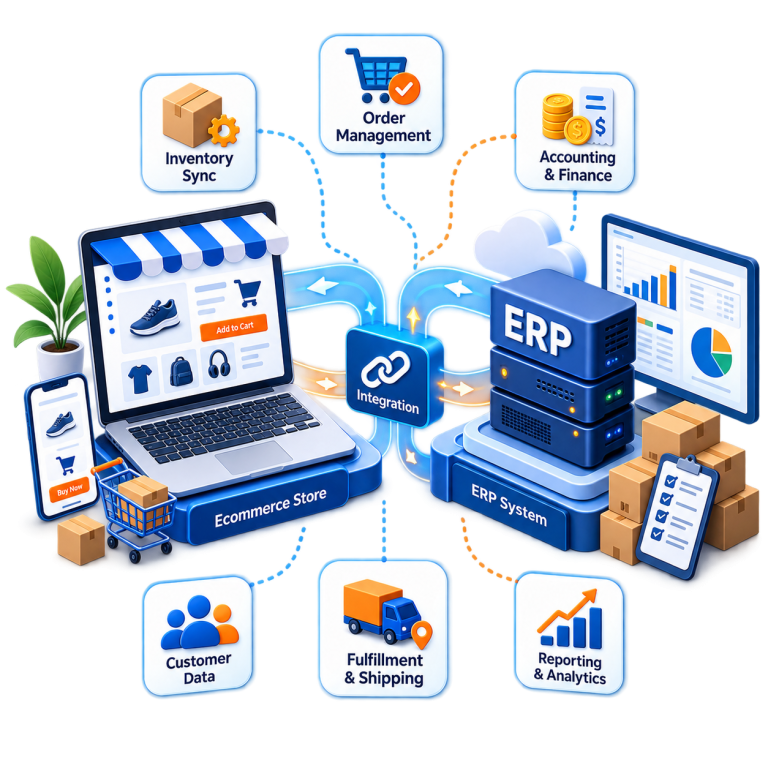
As an ecommerce business grows, orders, inventory, customer accounts, and financial records tend to spread across systems that don’t talk to each other, connected only by staff manually copying data between them. That manual step is where delays and errors creep in, from overselling items to invoices that don’t match orders. Ecommerce ERP integration solves this by creating an automated flow of information between the online store and the back-office systems running inventory, orders, accounting, and fulfillment.

What Is Ecommerce ERP Integration and How Does It Work?

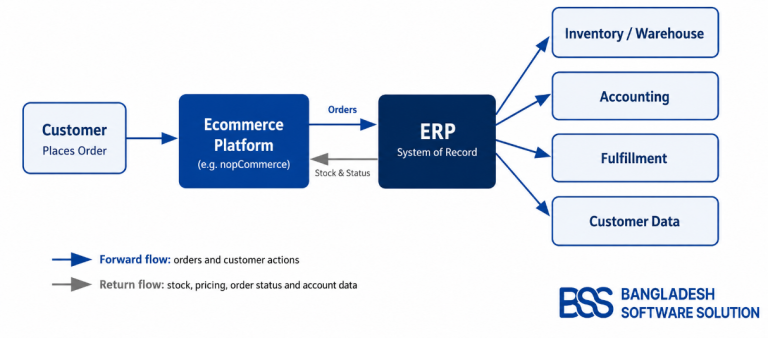
Ecommerce ERP integration connects an ecommerce platform with an enterprise resource planning (ERP) system so data moves between them automatically instead of being entered by hand in each one. The ecommerce store typically handles the customer-facing side, including browsing, checkout, and order placement, while the ERP manages inventory, warehouse activity, accounting, and fulfillment. With ERP integration with ecommerce in place, a new order placed on the storefront is sent to the ERP automatically, where it can trigger inventory deductions, picking instructions, and invoice generation. Information generated inside the ERP also flows back to the store: updated stock counts, order status, and customer-specific pricing. This exchange is usually built using APIs, prebuilt connectors, or middleware. Rather than operating as separate tools that happen to serve the same business, ecommerce integration with ERP treats them as one connected system with a single, consistent source of truth.

How order, inventory, and account data flow between the ecommerce platform and the ERP system.
Figure 1. How order, inventory, and account data flow between the ecommerce platform and the ERP system.

What Data Can Ecommerce and ERP Systems Synchronize?

The specific fields vary by business, but most ecommerce ERP integration services cover a similar core set of data, summarized below. This exchange is the basis of ERP inventory synchronization, ERP order management integration, and ongoing ERP data synchronization between the two systems.

Table 1: ERP vs Ecommerce in ERP

Data Ecommerce → ERP ERP → Ecommerce

Orders

New orders

Processing and status updates

Inventory

Sales deductions

Updated stock levels

Products

Changes, if applicable

Product information

Pricing

Promotions, if applicable

Pricing and customer-specific pricing

Customers

Customer and account information

B2B account data

Fulfillment

___

Shipping and tracking updates

Finance

Payment and order records

Invoice and accounting status

Why Ecommerce Businesses Integrate ERP Systems

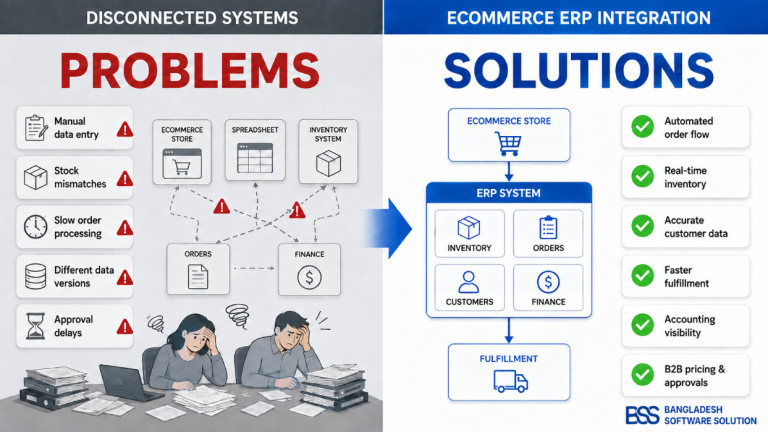
The benefits of ecommerce ERP integration become clear once manual processes start slowing operations down. Automating the flow of orders, inventory, and customer data cuts down on repetitive entry and the transcription errors that come from copying information between systems by hand. Inventory accuracy improves because stock levels update close to real time instead of through periodic manual checks, which matters most when the same products sell across multiple channels. Order processing speeds up because orders move directly into fulfillment workflows without manual entry into the ERP. Finance teams gain better visibility into revenue and invoices because sales data reaches accounting automatically. For B2B ecommerce ERP integration, connected systems make customer-specific pricing and approval workflows easier to manage. A few signs suggest a business has outgrown disconnected systems: staff manually re-entering orders into ERP software, stock counts that differ between the store and warehouse, several channels drawing from one shared inventory pool, and finance and warehouse teams working from different versions of the same data.

Figure 2. How ERP Integration solves disconnected systems in businesses

Why ERP Integration Matters More in B2B Ecommerce

B2B ecommerce ERP integration becomes particularly important because business buyers often operate under account-specific commercial rules that a standard ecommerce checkout cannot manage effectively on its own. The ERP can supply customerspecific pricing, allowing negotiated prices to appear automatically for the correct account, while credit limits and payment terms can determine how much a customer is allowed to purchase and when payment is due. Integration can also support purchase orders and accountlevel catalogs, so buyers see products and conditions relevant to their organization rather than a universal retail catalog.

More complex purchasing processes can be supported through approval workflows, where larger or restricted orders require authorization before fulfillment. Businesses operating from multiple warehouses can use ERP data to determine available inventory and appropriate fulfillment locations. Buyers and account managers may also access accurate invoice history without relying on separate manual records. Together, these capabilities make B2B ecommerce ERP integration especially valuable for companies managing complex customer relationships, purchasing rules, and account-level operations.

Ecommerce ERP Integration Approaches, Challenges & Best Practices

There is no single correct way to connect an ecommerce platform with an ERP system. ERP API integration is common when both systems expose documented APIs, allowing near real-time data exchange. Many platforms also offer prebuilt connectors for popular combinations, reducing development time. For complex environments, middleware or iPaaS tools sit between the two systems, handling data mapping and error handling, and custom integration work is often the most reliable option when business rules don’t fit standard patterns. This work often sits within a broader project involving APIs, platform customization, and ecommerce development services. Common ecommerce ERP integration challenges include inconsistent data between systems, older ERP platforms with limited API support, and synchronization failures that go unnoticed until data is visibly wrong. A few ecommerce ERP integration best practices help avoid these issues: define which system is authoritative for each data type, decide what genuinely needs real-time synchronization, clean data before connecting systems, use stable APIs, and test how the integration behaves during failures.

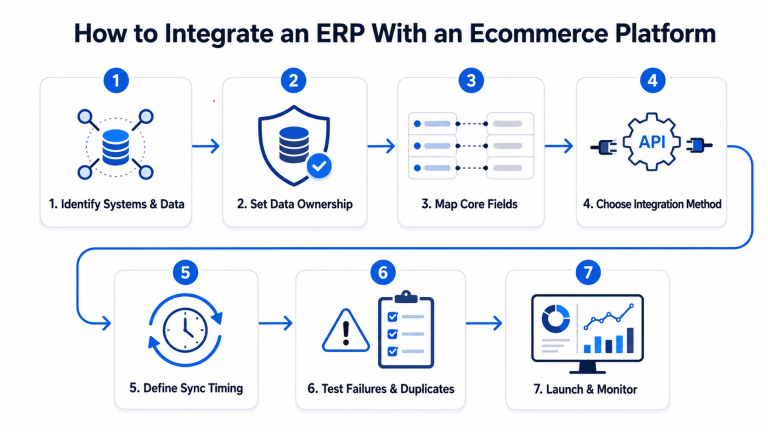
How to Integrate an ERP With an Ecommerce Platform

Figure 3. Key Steps in Ecommerce ERP Integration.
  1. Identify the systems and data that need to connect 
  2. Decide which system owns each data type. 
  3. Map products, customers, orders, inventory and pricing fields. 
  4. Choose API, connector, middleware or custom integration. 
  5. Define real-time vs scheduled synchronization. 
  6. Test failed transactions and duplicate records. 
  7. Launch with monitoring, error logging, retry handling, and a process for resolving failed synchronization jobs.

Where nopCommerce Fits Into ERP Integration

Businesses using or considering nopCommerce can apply the same principles to connect their store with ERP, CRM, accounting software, warehouse management, and shipping systems. Depending on the platforms involved, these connections can be built through APIs, existing connectors, middleware, or custom development. Bangladesh Software Solution works with nopCommerce development, customization, and integration projects, and the same decisions apply whether the goal is ERP integration or a broader ecommerce build-out.

From Bangladesh Software Splution Integration Experience

Bangladesh Software Solution’s work with OLA Sportswear shows how ecommerce ERP integration works in a real business environment. The project combined a nopCommerce storefront with a custom inventory ERP module, where real-time inventory synchronization helped keep stock information consistent across both systems and reduce the risk of overselling. The solution also supported B2B wholesale workflows with dedicated account approvals, customer-specific catalogs and pricing, alongside multi-currency functionality for European markets.

Projects like this highlight why data ownership and synchronization rules should be defined before development begins. Establishing how inventory, products, pricing, and customer information move between systems helps prevent conflicting updates and creates a more reliable integration as the business scales.

Choosing an Ecommerce ERP Integration Partner

Selecting a provider for ecommerce ERP integration services usually comes down to a few factors: platform and ERP experience, API and data-mapping knowledge, an understanding of real business workflows, and the ability to handle custom requirements as the business grows. Post-launch support and security matter as much as the initial build. Bangladesh Software Solution works across ecommerce platforms and provides and offers custom ERP integration services. Backend integration matters, but it works alongside the storefront experience: a store can be fully synchronized behind the scenes and still lose sales to ecommerce design mistakes that hurt conversions.

Conclusion

Ecommerce ERP integration is ultimately about creating a dependable flow of information between the online store and the systems running inventory, orders, finance, and fulfillment. Businesses running nopCommerce or other ecommerce architectures, especially those with B2B pricing rules, often benefit from experienced integration support. If your systems aren’t talking to each other yet, it may be worth discussing your requirements with a team that has handled similar projects.

Frequently Asked Questions

What is ecommerce ERP integration?

Ecommerce ERP integration connects an online store with an ERP system so information can move automatically between the two platforms. It helps synchronize areas such as orders, inventory, customer information, pricing, accounting, and fulfillment without relying on repeated manual data entry.

Businesses can synchronize orders, inventory levels, product information, pricing, customer accounts, payment records, invoices, and shipping or tracking updates. The exact data exchanged depends on the ecommerce platform, ERP system, and individual business requirements.

ERP integration can be built using APIs, prebuilt connectors, middleware or iPaaS platforms, or custom development. The best approach depends on the systems being connected, the complexity of the business rules, the required synchronization speed, and the availability of reliable APIs.

Common challenges include inconsistent data between systems, limited API support in older ERP platforms, duplicate records, synchronization failures, and unclear data ownership. These risks can be reduced by defining which system controls each type of data, cleaning data before integration, testing failure scenarios, and monitoring synchronization after launch.

Yes. nopCommerce can be connected with ERP systems as well as CRM, accounting, warehouse management, and shipping platforms. Depending on the systems involved, the integration can use APIs, existing connectors, middleware, or custom development to synchronize important ecommerce and back-office data.